1).actions file --> to add the custom conditions in workflow
2)Element.xml and Feature.xml
Feature.xml will have the location of element.xml
element.xml will have the custom actions which will contain information about executable code
Saturday, March 20, 2010


Sunday, January 10, 2010
Some things in SharePoint .. Should be Known Commonly..
We all know that whenever we add a list item or do some modification, we update the list. Here we have two options: A) 1)List.Update() creates automatically new version of list 2)List.SystemUpdate()does not create automatically new version of list. B)SPQuery To Query for items inside the folder SPQuery.ViewAttributes = "Scope='Recursive'"; or SPQuery.ViewAttributes = "Scope='RecursiveAll'"; C)Adding a Recurring Event to Lists on Multiple Sites D) To impersonate user checking out a file. SPSite site = new SPSite("SiteCollection_Url"); SPWeb web = site.OpenWeb(); SPUser user = web.AllUsers["User_Name"]; SPUserToken token = user.UserToken; SPSite impersonatedSiteCollection = new SPSite("SiteCollection_Url", token); E)Enabling the Send To Record option Enabled SPAdministration wp=new SPAdministration(); Uri url=new Uri("//portal/records/_vti_bin/officialfile.asmx") app.officialFileuri=url; app.officialFilename="Record"; app.Update(); F)To send the email to site users when item is added to custom list Write the event handler for ItemAdding event and write following SPSite site = new SPSite("http://yoursite"); SPWeb web = site.OpenWeb(); SPList lst = web.Lists["Alert Test"]; SPAlert alert = web.Alerts.Add(); alert.AlertFrequency = SPAlertFrequency.Immediate; alert.AlertType = SPAlertType.List; alert.EventType = SPEventType.All; alert.DynamicRecipient = "To"; alert.List = lst; alert.Status = SPAlertStatus.On; alert.Title = “Auto Email Alert”; alert.Filter = " alert.Update(); G)A very Nice tool for Workflow aspx forms H) a)WSP Builder b)Creating Custom fields using WSP Builder c)Overriding GetvalidateString Method of Custom field for validation I)Creating site definition in sharepoint Site definition have following files ListTemplateID a)WEBTEMP.XML Path:- Local_drive:\Program Files\Common Files\Microsoft Shared\Web server extensions\60\TEMPLATE\1033\XML Description:- Specifies configurations of lists and modules for a site definition. b)ONET.XML Path :-Local_drive:\Program Files\Common Files\Microsoft Shared\Web server extensions\60\TEMPLATE\1033\*\XML Decription:-Defines navigation bars such as the top link bar and the quick launch, available lists, document templates, base types, configurations, modules c) SCHEMA.XML Path :- Local_drive:\Program Files\Common Files\Microsoft Shared\Web Server Extensions\60\TEMPLATE\1033\Custom_Site_Template\LISTS Decription:-Defines the columns, views, and contents of a list |
Sunday, December 13, 2009
SharePoint FAQ
Please refer book 'Inside Microsoft Windows sharepoint services' and source code to understand following core concept of WSS 1)SCOPE AND ALLOWED FEATURES Web (Web site) * Control * Custom Action * Custom Action Group * Hide Custom Action * List Instance * List Template * Module (File Set) * Receiver Site (site collection) * Content Type * Content Type Binding * Control * Custom Action * Custom Action Group * Feature/Site Template Association * Field * Hide Custom Action * List Template * Module (File Set) * Workflow WebApplication (Web application) * Control * Custom Action * Custom Action Group * Document Converter * Feature/Site Template Association * Hide Custom Action Farm (farm) * Control * Custom Action * Custom Action Group * Feature/Site Template Association * Hide Custom Action 2)List and ListItem Events and Eventhandler to avoid item being deleted SPItemEventReceiver (class inherited) ItemDeleting (Event overrided) Properties.cancel=true 3)Custom Field type 1)steps to create custom field 2)some more 4)Features SPFeatureReceiver (class inherited) (Events overrided) FeatureInstalled(SPFeatureReceiverProperties properties) { } FeatureUninstalling(SPFeatureReceiverProperties properties) { } FeatureActivated(SPFeatureReceiverProperties properties) { Feature.xml which points to Elelements.xml(xml Files) Feature.xml Description="" Scope="Web" ImageUrl="" ReceiverAssembly="" ReceiverClass="" - Elements.xml CustomAction Id="SiteActionsToolbar" GroupId="SiteActions" Location="Microsoft.SharePoint.StandardMenu" Sequence="100" Title="" Description="" ImageUrl=""> < 5)Application Pages ans SitePages Application Page LayoutBase(Class inherited) Events(Events of controls on Aspx page) Location:(aspx pages in Template/layouts,namespace and assembly included in aspx) xml Files(Elements.xml and feature.xml) Location(Template/Featutes) Ghosting and Ungoshting Ghosted and uncustomized are terms used to describe site pages served up using file system templates. Unghosted and customized both refer to pages that exist entirely in the database, which no longer depend on a file system template |
Thursday, November 12, 2009
How to check if Workflow is already Running and to Avoid Error Exception from HRESULT: 0×8102009B
1: public static bool IsWorkflowRunning(SPListItem item, Guid baseID)
2: {
3: bool isRunning = false;
4:
5: SPWorkflowCollection workflowCol = item.Workflows;
6:
7: var query = from SPWorkflow work in item.Workflows
8: where work.ParentAssociation.BaseId == baseID && (work.InternalState & SPWorkflowState.Running) == SPWorkflowState.Running
9: select work;
10:
11: if (query.Count() > 0)
12: {
13: isRunning = true;
14: }
15:
16: return isRunning;
17: }
2: {
3: bool isRunning = false;
4:
5: SPWorkflowCollection workflowCol = item.Workflows;
6:
7: var query = from SPWorkflow work in item.Workflows
8: where work.ParentAssociation.BaseId == baseID && (work.InternalState & SPWorkflowState.Running) == SPWorkflowState.Running
9: select work;
10:
11: if (query.Count() > 0)
12: {
13: isRunning = true;
14: }
15:
16: return isRunning;
17: }
Wednesday, October 7, 2009
Monday, September 21, 2009
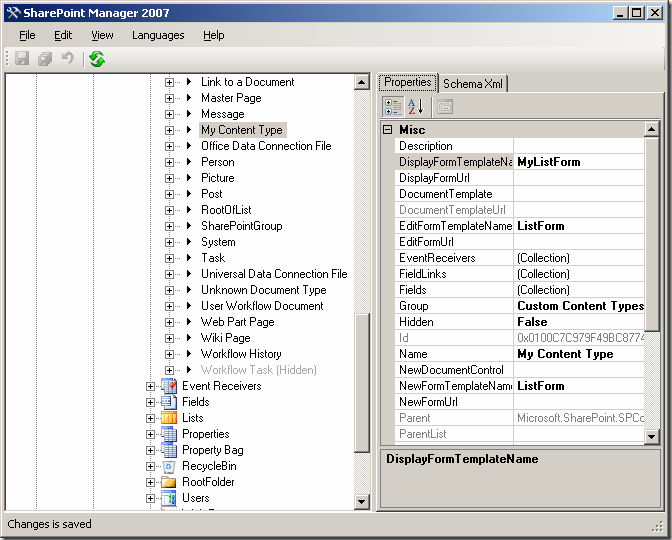
SharePoint Manger 2007 For Adding Customized content Type
Hello All,
First let me explain, what is content Type? Its FAQ and very important to understand,
A content type is a reusable collection of settings you want to apply to a certain category of content. Content types enable you to manage the metadata and behaviors of a document or item type in a centralized, reusable way.
for the exact definition visit
http://www.documentmanagementworkflowinfo.com/sharepoint-document-management/understand-basics-content-types-sharepoint.htm
For Customizing the New\Edit\Display Forms of Custom List
use SharePoint Manager which can be downloaded at codeplex
its a great tool for customizing content Types
Find more links on google for how to do it
like 1) http://sharepointmagazine.net/technical/development/customizing-the-user-experience-of-sharepoint-content-type-user-interface-part-4-of-6
2)Book on Share Point Manager 2007
First let me explain, what is content Type? Its FAQ and very important to understand,
A content type is a reusable collection of settings you want to apply to a certain category of content. Content types enable you to manage the metadata and behaviors of a document or item type in a centralized, reusable way.
for the exact definition visit
http://www.documentmanagementworkflowinfo.com/sharepoint-document-management/understand-basics-content-types-sharepoint.htm
For Customizing the New\Edit\Display Forms of Custom List
use SharePoint Manager which can be downloaded at codeplex
its a great tool for customizing content Types
Find more links on google for how to do it
like 1) http://sharepointmagazine.net/technical/development/customizing-the-user-experience-of-sharepoint-content-type-user-interface-part-4-of-6
2)Book on Share Point Manager 2007

Saturday, September 12, 2009
validation with standard sharepoint error Page on ListItem adding event
To add validation to listitem adding event( to restrict the no of items to be added per day)in list
1) Visual studio 2008 -->Sharepoint-->Empty Project
2)In solution explorer-->add new item --> content type
3)And check content type with event receiver, you will find three 2 .cs files and 1 xml file
a)itemeventreciver.cs
b)ListItemReciver.cs
in this file uncomment the ItemAdding event
add the following code required for the restriction
public override void ItemAdding(SPItemEventProperties properties)
{
int perday = GetItemCountPerDay();
string dt= properties.AfterProperties[CONST_FIELD_DATETIME].ToString();
SPQuery query = QueryItemForPerDay(dt);
using (SPWeb oWebsite = new SPSite(properties.SiteId).OpenWeb(properties.RelativeWebUrl))
{
SPListItemCollection collItems = oWebsite.Lists[properties.ListTitle].GetItems(query);
if ((collItems != null) && (collItems.Count > perday - 1))
{
properties.ErrorMessage = String.Format("Adding items to this list is not supported because per day only allowed add {0} items.", PER_DAY);
properties.Cancel = true;
}
}
}
c).xml file
4)Deploy the project
To enable the content type
go to the site Site actions -->create new custom list --> enable the content types for the site
list settings-->advanced settings--selct deployed content type
5)Go to wss --> virtual diectories-> site --> open the web.config file and do the following changes
sharepoint
safemode MaxControls="200" CallStack="false" DirectFileDependencies="10" TotalFileDependencies="50" AllowPageLevelTrace="false"
customerrors mode="On"
1) Visual studio 2008 -->Sharepoint-->Empty Project
2)In solution explorer-->add new item --> content type
3)And check content type with event receiver, you will find three 2 .cs files and 1 xml file
a)itemeventreciver.cs
b)ListItemReciver.cs
in this file uncomment the ItemAdding event
add the following code required for the restriction
public override void ItemAdding(SPItemEventProperties properties)
{
int perday = GetItemCountPerDay();
string dt= properties.AfterProperties[CONST_FIELD_DATETIME].ToString();
SPQuery query = QueryItemForPerDay(dt);
using (SPWeb oWebsite = new SPSite(properties.SiteId).OpenWeb(properties.RelativeWebUrl))
{
SPListItemCollection collItems = oWebsite.Lists[properties.ListTitle].GetItems(query);
if ((collItems != null) && (collItems.Count > perday - 1))
{
properties.ErrorMessage = String.Format("Adding items to this list is not supported because per day only allowed add {0} items.", PER_DAY);
properties.Cancel = true;
}
}
}
c).xml file
4)Deploy the project
To enable the content type
go to the site Site actions -->create new custom list --> enable the content types for the site
list settings-->advanced settings--selct deployed content type
5)Go to wss --> virtual diectories-> site --> open the web.config file and do the following changes
sharepoint
safemode MaxControls="200" CallStack="false" DirectFileDependencies="10" TotalFileDependencies="50" AllowPageLevelTrace="false"
customerrors mode="On"
Subscribe to:
Posts (Atom)

