Loading...
Showing posts with label Infopath. Show all posts

Monday, September 19, 2011

'value does not fall in expected range' When assigning SPUser to ListItem


If you try to assign,
ListItem["UserField"]=SPContext.Web.CurrentUser
And you get th Error  " value does not fall in expected range"
Cause:  ListItem is in different Sitecollection
So Directly You can not assign current user.
Resolution:
SPUser differntSiteCollectionUser = differentWeb.SiteUsers.GetByEmail(currentUserMailId);-->GetmailID with SPFieldUserValue

Thursday, September 8, 2011

Modal Popup and The Notification Area

Here I am covering
        1)Passing Url to Modal Popup from Server code in .cs file
          i)add the hiddenfield control to .aspx page          
and set value in cs file
hdnUrl.Value = "../Lists/ListName/NewForm.aspx?RootFolder=&";

        2)On Click of Ok button of Modal Popup Displaying the message in notification area which is part of sp2010 framework
Add following in Javascript tags
var url = document.getElementById('').value;

var options = {

url: url

title: "title",

allowMaximize: true,

showClose: true,

dialogReturnValueCallback: refreshCallback

};

function open() { SP.UI.ModalDialog.showModalDialog(options); }

function silentCallback(dialogResult, returnValue) {

}

function refreshCallback(dialogResult, returnValue) {

SP.UI.Notify.addNotification('Successful!');

SP.UI.ModalDialog.RefreshPage(SP.UI.DialogResult.OK);

}


Invoke the function

asp:Label runat="server" ID ="lblr" Text ="Open Popup">

Thursday, August 4, 2011

A Method To Get Selected Value in spuc:PeopleEditor control (Quickly)

-- Add Control in ascx


AllowEmpty="true" MultiSelect="false" SelectionSet="User" />
 
-- Get User value in ascx.cs
public SPUser GetUser(PeopleEditor p)

{

PickerEntity entPropMgr = (PickerEntity)p.ResolvedEntities[0];

SPFieldUserValue Proposalmgrvalue = new SPFieldUserValue(SPContext.Current.Web, Convert.ToInt16(entPropMgr.EntityData[PeopleEditorEntityDataKeys.UserId]), entPropMgr.Description);

if (Proposalmgrvalue != null)

return Proposalmgrvalue.User;

else

return SPContext.Current.Web.CurrentUser;


}

Wednesday, August 3, 2011

SPDispose Check Results

- I have noticed that objects(SPWeb) created inside for loops are not being disposed. These objects need to be disposed eventhough you main block of code is "Using".

- Also when you use following snippet it will not dispose SPSite object:
using(SPWeb oWeb=new SPSite("http://abc").openWeb())

{

-------

}
Here SPSite object is not disposed so follow below style in case of such scenerios:

using(SPSite oSite=new SPSite("url"))

{

using(SPWeb oWeb=oSite.OpenWeb())

{

------

}

}


This will solve the problem of disposing.
- Do not use "Using" when you work with SPContext. As SPContext are disposed automatically and if you use withing Using block than it will dispose SPWeb object and page will not work.

Saturday, July 9, 2011

Modal Popup with Content Editor Webpart

Open the sharepoint Site
In Ribbon,Find Insert Link-->Select Webparts-->In Media and Content Category-->Select Content Editor Webpart.-->Add/Edit the webpart

In SP 2010, Select Contents in CEWP, Format--> Html Source in the ribbon,
Add the javacript code
<script type="text/javascript">
     function OpenDialog(URL) {
         var NewPopUp = SP.UI.$create_DialogOptions();
         NewPopUp.url = URL;
         NewPopUp.width = 700;
         NewPopUp.height = 350;
         SP.UI.ModalDialog.showModalDialog(NewPopUp);
     }
 script>

=  "javascript:OpenDialog(‘../_layouts/MyAppPage/MyPage.aspx’)"--To Make it Server relative.
So that Dialog box opens anywhere in site collection

Wednesday, October 15, 2008

Saving the the Repeating table Data with Webservice

Hello All,
Do u want to make the repeating table, to work like gridview ?



Follow these steps

To disable every row of the infopath and enable only after selecting each row
a)Set any textbox value as hidden control and set its default value to 0(Textbox should be inside repeating table and binding field representable for textbox should be repeating)
b)To make every control disabled inside repeating table ,you need to use the conditional formatting for every control ,selecting field of the table
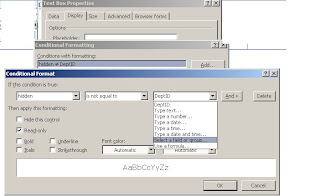


now on click of the select button u neeed to change the value of hidden textbox
as follows
public void btnSelect_Clicked(object sender, ClickedEventArgs e)
{

//code to enable the disabled row of repeating table
XPathNavigator MainDs = MainDataSource.CreateNavigator();

XPathNavigator x1 = e.Source.SelectSingleNode("CompanyID", NamespaceManager);

MainDs.SelectSingleNode("/my:myFields/my:hidden", NamespaceManager).SetValue(x1.InnerXml.ToString());//Set the hidden field value


}

After updating values of selected row, saving the value to database

//Executing the webservice programaticaly
public void btnSave_Clicked(object sender, ClickedEventArgs e)
{


// DataConnection dn = new DataConnection();
// WebServiceConnection wb = new WebServiceConnection();
//// wb.
XPathNavigator MainDs = MainDataSource.CreateNavigator();

MainDs.SelectSingleNode("/my:myFields/my:hidden", NamespaceManager).SetValue("0");//Set the hidden field value

// Open connection.
WebServiceConnection wsc = (WebServiceConnection)this.DataConnections["SaveComp"];//Name of the webservice as dataconnection

// Create XmlDocuments.
XmlDocument inputDocument = new XmlDocument();
XmlDocument outputDocument = new XmlDocument();
XmlDocument errorsDocument = new XmlDocument();

// Load input document.
XPathNavigator x1 = e.Source.CreateNavigator();
// inputDocument.LoadXml(x1.OuterXml.ToString());
//SaveDepartmentsWithID
inputDocument.LoadXml(@"<SaveDepartmentsWithID xmlns='http://tempuri.org/'>" + x1.InnerXml.ToString() + "");//Name of the webmethod SaveDepartmentsWithID

// Create XPathNavigator objects for documents.
XPathNavigator inputNav = inputDocument.CreateNavigator();
XPathNavigator outputNav = outputDocument.CreateNavigator();
XPathNavigator errorsNav = errorsDocument.CreateNavigator();

// Call Execute method.
wsc.Execute(inputNav, outputNav, errorsNav);


// Write your code here.
}

Thursday, September 18, 2008

Conditional sum with infopath form

Hello All
To get the conditional sum in repeating table (which acts like gridview)
as follows


1)Set the property of repeating table as given following image


Add textbox(field2) to the row of repeating table and other textbox(field4) to the footer
of table and checkbox as shown in the fig

right click on the properties of textbox-->change the default value by clicking on fx
--insert function-->select sum-> insert field-->select the field-->click on the filter button-->select the checkbox value is equal to true

as shown

Databinding of controls on load of infopath forms

Hello All,
To retrieve the data from the webservice and to populate(Databind) the data on infopath form. follow the following steps
from menu of design view of infopath form
1)Tools-->DataConnection->Add connection as webservice to retrieve the data


2)Right click on textbox which is to be binded to the field from dataset
--->Insert formula-->Insert field/group

from Data source dropdown select the name of the webservice which acts like the secondary datasource(Webservice which returns Dataset and which is hosted as virtual directory in the same webapplication)


3) bind the queryfield in dataset if the textbox acts like parameter
bind the datafield in dataset if it acts like output from the webservice